Substack vs. Webflow – Making the Right Choice
Introduction
Two platforms. Two very different philosophies. One important decision.
Substack has taken the creator economy by storm — making it incredibly simple for writers, journalists, and thought leaders to launch newsletters and build paid subscriber communities.
Webflow has become the go-to tool for designers and businesses who want complete creative control over their web presence — building visually stunning, professionally crafted websites without writing a single line of code.
At first glance, these two platforms don’t even seem like direct competitors. But in 2024 and heading into 2026, more and more creators, freelancers, small business owners, and media companies are standing at this exact crossroads — trying to decide which platform deserves their time, energy, and money.
Should you build your audience on Substack’s built-in network? Or should you invest in a fully custom Webflow site that you control completely?
This guide answers that question — thoroughly, honestly, and without hype.
We’ll compare both platforms across every dimension that matters: ease of use, design, monetization, SEO, audience building, pricing, and long-term growth potential.
By the end of this post, you’ll know exactly which platform is right for you.
Quick Overview: What Are We Actually Comparing?
Before we dive into the details, let’s make sure we understand what each platform actually is.
What Is Substack?
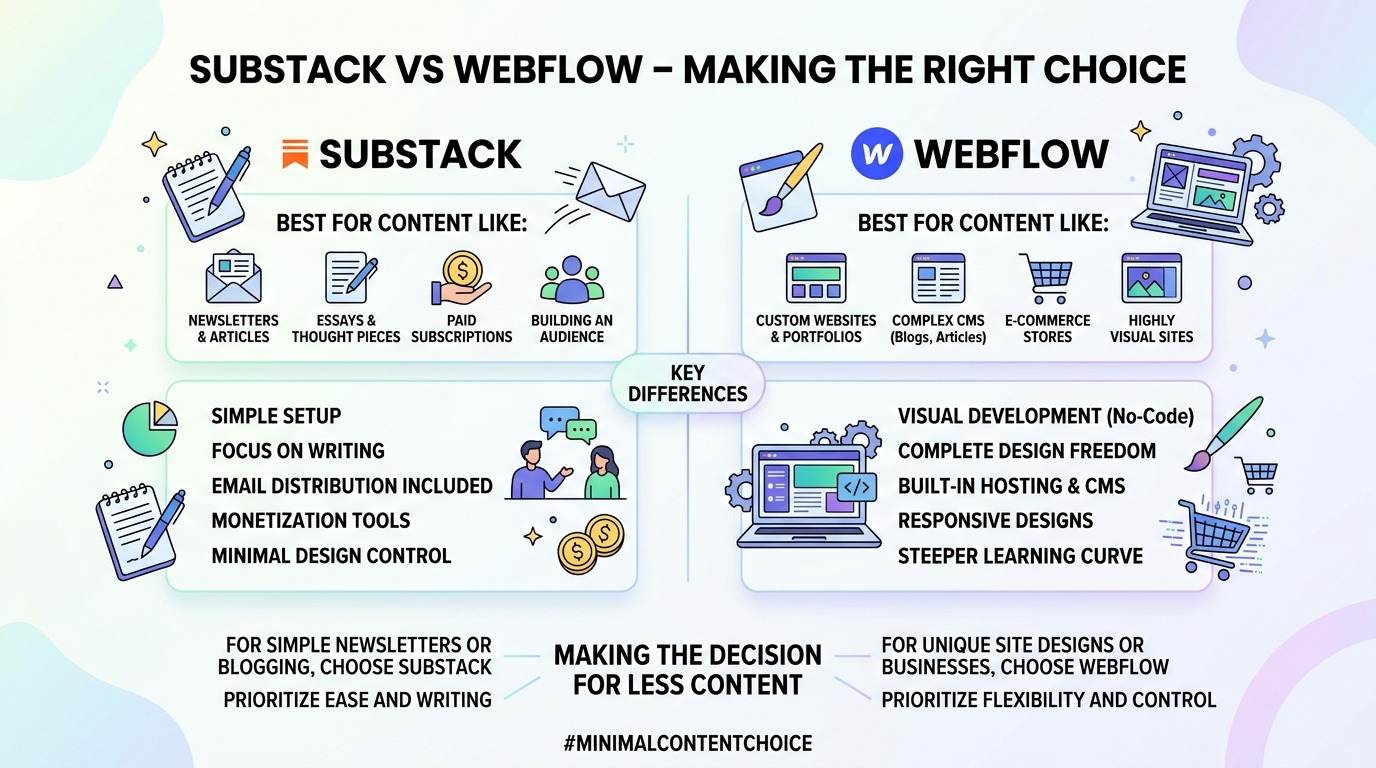
Substack is a newsletter and publishing platform that allows writers to send email newsletters — free or paid — directly to subscribers. It launched in 2017 and has grown into one of the most popular platforms in the creator economy.
Key characteristics:
- Built specifically for writers and content creators
- Newsletter-first platform with a built-in subscriber network
- Monetization through paid subscriptions is central to the platform
- Minimal design customization
- Free to start with revenue sharing on paid subscriptions
Reference: Substack Official Site
What Is Webflow?
Webflow is a visual web design and CMS platform that lets designers and developers build fully custom websites without writing code — while still generating clean, production-ready HTML, CSS, and JavaScript.
Key characteristics:
- Visual design tool with pixel-perfect control
- Full CMS capabilities for content-driven sites
- Hosting included on paid plans
- Powerful for marketing sites, portfolios, and blogs
- Steeper learning curve but greater flexibility
Reference: Webflow Official Site
At a Glance: Substack vs. Webflow Comparison Table
| Feature | Substack | Webflow |
|---|---|---|
| Primary Purpose | Newsletter & Subscription Platform | Visual Website Builder & CMS |
| Ease of Use | Very Easy | Moderate to Advanced |
| Design Flexibility | Very Limited | Extremely High |
| Built-in Audience | Yes (Substack Network) | No |
| Email Newsletter | Core Feature | Requires Integration |
| Monetization | Built-in (Subscriptions) | Requires Third-Party Tools |
| SEO Control | Limited | Strong |
| Custom Domain | Yes (free plans too) | Yes (paid plans) |
| Hosting | Included | Included (paid plans) |
| Starting Price | Free | Free (limited) |
| Revenue Share | 10% of paid subscriptions | None |
| E-commerce | No | Yes (limited) |
| Best For | Writers, Journalists, Creators | Designers, Agencies, Businesses |
Round 1: Ease of Use
Substack
Substack is genuinely one of the easiest publishing platforms ever created. Setting up a Substack takes literally five to ten minutes:
- Create an account
- Name your publication
- Write your first post
- Hit publish or send
There’s no hosting to configure, no plugins to install, no templates to wrestle with. The editor is clean, distraction-free, and focused entirely on writing.
For non-technical users — especially writers who just want to write — Substack is as frictionless as it gets. You can go from zero to published in the time it takes to drink a cup of coffee.
What you can do:
- Write and publish posts
- Send email newsletters
- Accept paid subscriptions
- Record and publish podcasts
- Host video content
- Manage subscriber lists
What requires no technical knowledge:
- Everything. Seriously.
Learning Curve: ⭐ (Almost none)
Webflow
Webflow is a different experience entirely. It’s powerful, but it demands investment.
New users often describe their first hour with Webflow as overwhelming. The interface introduces design concepts that many non-designers find unfamiliar:
- CSS box model
- Flexbox and Grid systems
- Responsive breakpoints
- Interactions and animations
- CMS Collections and dynamic content
- Class-based styling system
Webflow University provides excellent free tutorials, but realistically, expect two to four weeks before you feel genuinely comfortable building in Webflow.
Once you’re past that learning curve, Webflow becomes remarkably efficient. But getting there requires real commitment.
Learning Curve: ⭐⭐⭐⭐ (Steep but rewarding)
🏆 Winner: Substack
For pure ease of use, Substack has no competition. It’s designed to remove every possible barrier between you and publishing.
Round 2: Design and Customization
Substack Design
Let’s be honest — Substack’s design capabilities are minimal by choice.
You can customize:
- ✅ Publication name and description
- ✅ Logo and cover image
- ✅ Accent color
- ✅ Custom domain
- ✅ Basic layout of your publication homepage
That’s essentially it. Every Substack looks more or less like every other Substack. There’s a reason for this — Substack believes the writing should be the focus, not the design. And for many writers, that’s completely fine.
But if brand identity and visual differentiation matter to you — if you want your site to look uniquely yours — Substack will frustrate you.
Design Flexibility Score: 2/10
Webflow Design
Webflow exists precisely to give designers and creators complete visual control over their website.
You can customize:
- ✅ Every pixel of every layout
- ✅ Typography at the most granular level
- ✅ Complex animations and scroll interactions
- ✅ Custom hover states and transitions
- ✅ Fully responsive designs with custom breakpoints
- ✅ Video backgrounds, parallax effects, and micro-interactions
- ✅ Custom cursors, loading screens, and page transitions
- ✅ Global design system with style guides
The result? Webflow sites can look absolutely stunning and completely unique. Some of the most beautifully designed websites on the internet are built with Webflow.
Design Flexibility Score: 10/10
🏆 Winner: Webflow
It’s not even close. Webflow is built for design. Substack is built for writing.
Round 3: Pricing
Substack Pricing
Substack’s pricing model is refreshingly simple:
Free to publish:
- Unlimited free subscribers
- Unlimited posts
- Custom domain
- All core features
Paid subscriptions:
- Substack takes 10% of all paid subscription revenue
- Payment processing fees (Stripe): approximately 2.9% + $0.30 per transaction
- You keep the remaining ~87%
What this means in practice:
| Monthly Revenue | Substack Fee (10%) | You Keep |
|---|---|---|
| $500/month | $50 | ~$435 |
| $1,000/month | $100 | ~$870 |
| $5,000/month | $500 | ~$4,350 |
| $10,000/month | $1,000 | ~$8,700 |
At low revenue levels, Substack’s model is extremely creator-friendly — you pay nothing until you earn. At high revenue levels, that 10% becomes a meaningful ongoing cost.
Webflow Pricing
Webflow uses a subscription model with separate plans for sites and workspaces:
Site Plans:
| Plan | Monthly Price (Billed Annually) | Key Features |
|---|---|---|
| Starter | Free | 2 pages, webflow.io domain |
| Basic | $14/month | 150 pages, custom domain |
| CMS | $23/month | 2,000 CMS items, 3 editors |
| Business | $39/month | 10,000 CMS items, 10 editors |
| Enterprise | Custom pricing | Unlimited, advanced features |
Additional costs to consider:
- Email newsletter tool (Mailchimp, ConvertKit, etc.): $15 — $100+/month
- Payment processing for any products/services
- Premium templates: $49 — $149 (one-time)
Total realistic cost for a content creator on Webflow:
- Webflow CMS plan: $23/month
- Email tool (basic): $15 — $30/month
- Total: $38 — $53/month minimum
🏆 Winner: Substack (for Beginners)
Substack is genuinely free to start. Webflow requires ongoing subscription costs plus additional tools to match Substack’s built-in features.
Round 4: Monetization
Substack Monetization
Monetization is Substack’s superpower. It’s baked directly into the platform with zero technical setup required.
How it works:
Writers offer a free tier (regular newsletter) and a paid tier (premium content). Readers pay a monthly or annual subscription fee to access premium content.
Monetization features:
- ✅ Monthly and annual subscription pricing
- ✅ Founding member pricing (higher-tier supporters)
- ✅ Paid podcast content
- ✅ Paid video content
- ✅ Group subscriptions (for teams and organizations)
- ✅ Gift subscriptions
- ✅ Referral programs
- ✅ Substack Recommendations (cross-promote with other writers)
The power of built-in monetization:
You don’t need a payment processor account, a membership plugin, or a separate email platform. Everything works together seamlessly from day one.
Many Substack writers earn meaningful income — from a few hundred dollars a month to six figures annually — entirely through their subscriber base.
Monetization Setup Difficulty: Extremely easy — done in minutes
Webflow Monetization
Webflow itself doesn’t have built-in subscription or membership monetization. To monetize a Webflow site, you need third-party integrations:
For newsletter subscriptions:
- Memberstack — Membership and paywall tool for Webflow
- Outseta — All-in-one membership platform
- Stripe — Direct payment processing with custom implementation
For e-commerce:
- Webflow’s native e-commerce (limited)
- Integration with external platforms
For email newsletters:
- ConvertKit — Popular with creators
- Mailchimp — Widely used email platform
- Beehiiv — Newsletter platform with monetization
Monetization Setup Difficulty: Moderate to complex — requires multiple tools and integrations
The flexibility is there — you can build almost any monetization model on Webflow. But it requires significant more effort to set up, and ongoing costs from multiple tools add up quickly.
🏆 Winner: Substack
Built-in, zero-setup monetization is one of Substack’s defining advantages.
Round 5: Audience Building
Substack Audience Building
This is one of Substack’s most underrated advantages — the built-in Substack network.
Substack has built a discovery ecosystem that helps new writers find readers:
Network features:
- Substack Recommendations — Writers recommend other writers, sending subscribers cross-platform
- Substack Notes — A Twitter/X-like social feed built directly into Substack for short-form content
- Explore page — Discovery page where readers find new publications
- Substack app — Mobile app where readers follow multiple publications
This network effect is genuinely powerful, especially for new creators. Growing an audience on Substack from zero is significantly easier than growing from zero on a standalone website.
Additionally, every subscriber you gain on Substack is an email subscriber — giving you a direct communication channel that no algorithm can take away.
Webflow Audience Building
Webflow provides zero built-in audience building tools. There is no Webflow network. No discovery page. No cross-site recommendations.
To build an audience with a Webflow site, you need to:
- Build your own SEO strategy
- Grow social media presence independently
- Set up an email capture system (ConvertKit, Mailchimp, etc.)
- Create and distribute content consistently
- Run paid advertising campaigns
- Build backlinks for search visibility
This isn’t necessarily a disadvantage — many websites built on Webflow attract massive audiences through excellent SEO and content marketing. But it requires significantly more work and strategy compared to Substack’s built-in network.
🏆 Winner: Substack
The built-in network and email-first model give Substack a significant audience-building advantage for new creators.
Round 6: SEO Capabilities
Substack SEO
Substack has made SEO improvements over the years, but it remains a significant limitation of the platform.
What Substack offers for SEO:
- ✅ Custom domain support
- ✅ Custom meta titles and descriptions
- ✅ Automatic sitemap generation
- ✅ Clean URL structure
- ✅ SSL included
Substack SEO limitations:
- ❌ Limited control over technical SEO settings
- ❌ No schema markup control
- ❌ No control over page speed optimization
- ❌ Limited header tag structure control
- ❌ No canonical tag management
- ❌ All sites share Substack’s server infrastructure
- ❌ Limited ability to create SEO-optimized landing pages
The reality is that Substack was built for email, not search. Many successful Substack writers drive almost no traffic from Google — they grow through email sharing and Substack’s own network instead.
SEO Score: 4/10
Webflow SEO
Webflow is a genuinely strong SEO platform:
What Webflow offers for SEO:
- ✅ Clean, semantic HTML output
- ✅ Full meta title and description control
- ✅ Custom canonical tags
- ✅ 301 redirect management
- ✅ Automatic XML sitemap generation
- ✅ Open Graph and social meta tags
- ✅ Fast page speeds (excellent for Core Web Vitals)
- ✅ SSL included on all plans
- ✅ Schema markup (via custom code)
- ✅ Complete control over heading structure
- ✅ Image alt text management
- ✅ Global CDN for fast load times
Webflow’s clean code output and fast hosting infrastructure mean that technical SEO foundations are solid by default. Combined with a strong content strategy, Webflow sites can rank exceptionally well.
SEO Score: 8.5/10
🏆 Winner: Webflow
Webflow gives you significantly more control over SEO — critical for long-term organic growth.
Round 7: Content Management
Substack Content Management
Substack’s content management is simple and focused:
Content types:
- Newsletter posts (the core)
- Podcast episodes
- Video content
- Notes (short-form social posts)
Publishing features:
- ✅ Distraction-free writing editor
- ✅ Draft saving and scheduling
- ✅ Free and paid content gating
- ✅ Archive of all published posts
- ✅ Basic analytics (opens, clicks, subscriber growth)
- ✅ Comment sections with subscriber-only options
Limitations:
- No custom post types
- Limited content organization (no categories or tags)
- No advanced editorial workflow
- No multi-author management
For a solo writer publishing newsletters, Substack’s content management is perfectly adequate. For anything more complex, it becomes limiting.
Webflow Content Management
Webflow’s CMS is a genuine content management system with real depth:
Content features:
- ✅ Custom content collections (like custom post types)
- ✅ Fully customizable content fields
- ✅ Categories, tags, and custom taxonomies
- ✅ Multi-author support
- ✅ Scheduled publishing
- ✅ Revision history
- ✅ Bulk content management
- ✅ Dynamic content display anywhere on the site
- ✅ Reference fields (connect content collections)
- ✅ CSV import for bulk content
The Webflow Editor also allows non-technical team members to edit content directly on the page — no design training required.
🏆 Winner: Webflow
Significantly more powerful content management capabilities.
Round 8: Newsletter and Email Features
Substack Email Features
Email is Substack’s home territory. The platform is built around newsletter delivery:
- ✅ Beautiful, simple email templates
- ✅ Automatic delivery to all subscribers
- ✅ Subscriber management dashboard
- ✅ Subscriber import and export
- ✅ Email open and click tracking
- ✅ Paid vs. free subscriber segmentation
- ✅ Scheduled email delivery
- ✅ Welcome email automation
- ✅ Email deliverability managed by Substack
Substack handles all email infrastructure — deliverability, spam compliance, unsubscribe management, and list hygiene. You just write.
Webflow Email Features
Webflow has no native email newsletter capability. To send newsletters from a Webflow site, you must integrate a separate email platform:
Popular integrations:
- ConvertKit — Creator-focused email platform
- Mailchimp — Industry standard for small businesses
- Beehiiv — Newsletter-focused platform with monetization
- ActiveCampaign — Advanced automation for businesses
These integrations work, but they add:
- Additional monthly cost ($15 — $100+/month)
- Technical setup complexity
- Multiple platforms to manage
- Potential sync issues between platforms
🏆 Winner: Substack
Email is Substack’s core competency. Webflow requires additional tools and cost.
Round 9: Ownership and Data Control
Substack Ownership
This is a critical consideration that many creators overlook when starting on Substack.
What you own:
- ✅ Your content (you can export all posts)
- ✅ Your subscriber email list (exportable as CSV)
- ✅ Your paid subscriber relationships
What you don’t fully control:
- ❌ The platform itself — if Substack changes its terms, pricing, or policies, you’re affected
- ❌ Your publication’s design and presentation
- ❌ The algorithm that drives discovery
- ❌ Platform fees — Substack can change its 10% cut
- ❌ Feature availability — Substack decides what features exist
The most important risk: platform dependency. If Substack shuts down, pivots its business model, or dramatically changes its terms of service, your business is affected.
That said, Substack does allow you to export your subscriber list — which means you can migrate to another platform if needed. This is significantly better than some other creator platforms.
Webflow Ownership
Webflow also involves some platform dependency — if Webflow changes its pricing or policies, you’re affected. But the nature of that dependency is different:
What you own:
- ✅ Your content (exportable)
- ✅ Your design assets
- ✅ Your subscriber email list (through your email platform)
- ✅ Your domain (completely portable)
What you don’t fully control:
- ❌ The Webflow hosting infrastructure
- ❌ Platform pricing changes
- ❌ Feature availability
However, because Webflow generates standard HTML, CSS, and JavaScript, you can export your site code and host it anywhere if you leave Webflow. This gives you a meaningful ownership advantage.
🏆 Winner: Webflow
The ability to export clean code and host anywhere gives Webflow users more long-term control.
Round 10: Analytics and Insights
Substack Analytics
Substack provides basic but useful analytics:
- ✅ Total subscriber count (free vs. paid)
- ✅ Email open rates
- ✅ Click-through rates
- ✅ Subscriber growth over time
- ✅ Revenue dashboard (for paid publications)
- ✅ Individual post performance
Limitations:
- No page view analytics
- No traffic source tracking
- No conversion funnel analysis
- No advanced audience segmentation
- No Google Analytics integration
For a writer focused on subscriber growth and email engagement, Substack’s analytics are sufficient. For anyone who wants deeper business intelligence, they fall short.
Webflow Analytics
Webflow has basic built-in analytics on higher plans, but the real strength comes from integrations:
- ✅ Google Analytics 4 integration
- ✅ Google Search Console integration
- ✅ Facebook Pixel integration
- ✅ Any analytics tool via custom code
- ✅ Hotjar for heatmaps and user recordings
- ✅ Mixpanel for product analytics
The ability to integrate any analytics platform means you can build a comprehensive picture of your audience — where they come from, what they read, how they convert, and where they drop off.
🏆 Winner: Webflow
Third-party analytics integrations give Webflow users far deeper business intelligence.
Final Scorecard
| Category | Substack | Webflow |
|---|---|---|
| Ease of Use | 🏆 Winner | — |
| Design & Customization | — | 🏆 Winner |
| Pricing | 🏆 Winner | — |
| Monetization | 🏆 Winner | — |
| Audience Building | 🏆 Winner | — |
| SEO Capabilities | — | 🏆 Winner |
| Content Management | — | 🏆 Winner |
| Email & Newsletter | 🏆 Winner | — |
| Ownership & Control | — | 🏆 Winner |
| Analytics & Insights | — | 🏆 Winner |
| Total | 5 Wins | 5 Wins |
It’s a Tie — But That Tells You Something Important
The fact that both platforms win five categories each is not a cop-out. It’s actually the most honest answer possible.
Substack and Webflow are built for fundamentally different creators with fundamentally different goals.
The question isn’t “which platform is better?” The question is “which platform is better for you?”
Who Should Choose Substack?
✅ Writers and Journalists
If writing is your craft and your newsletter is your product, Substack is purpose-built for you. The distraction-free editor, zero-setup publishing, and built-in audience network are genuinely powerful for writers.
✅ Creators Starting From Zero
If you have no existing audience, no technical background, and no budget — Substack lets you start building immediately with zero upfront cost.
✅ Thought Leaders and Experts
If you have expertise and opinions that people want to pay for, Substack’s subscription model is one of the fastest ways to monetize your knowledge directly.
✅ Podcasters and Multimedia Creators
Substack now supports audio and video content natively, making it a solid platform for creators who want to combine newsletters with podcast episodes.
✅ People Who Hate Technology
If you want to spend 100% of your time creating and 0% of your time dealing with tech — Substack is your platform.
✅ Community Builders
Substack’s comment sections, discussions, and Notes feature create genuine community around your publication — something Webflow can’t replicate natively.
Who Should Choose Webflow?
✅ Designers and Creative Professionals
If your website is a showcase of your creative work, Webflow gives you the canvas to build something truly remarkable — no templates, no compromises.
✅ Businesses and Brands
For businesses that need a professional marketing website with complete brand control, Webflow delivers a level of design quality that Substack simply can’t match.
✅ SEO-Focused Content Creators
If organic search traffic is central to your growth strategy, Webflow’s SEO capabilities are significantly stronger than Substack’s.
✅ Agencies and Freelancers
Webflow’s workspace features make it an excellent platform for managing multiple client websites — something impossible on Substack.
✅ Creators Who Want Full Ownership
If you want maximum control over your content, your design, your data, and your platform — Webflow gives you more long-term ownership.
✅ Multi-format Content Operations
If you’re running a publication with multiple authors, custom content types, and complex editorial workflows — Webflow’s CMS handles it better.
The Hybrid Strategy: Using Both Together
Here’s the approach many successful creators are using in 2026 — combining Webflow and Substack to get the best of both worlds.
How It Works:
Webflow handles:
- Your main website and brand presence
- SEO-optimized blog posts and landing pages
- Portfolio and case studies
- Product and service pages
- Lead capture and email opt-ins
Substack handles:
- Your newsletter delivery and subscriber management
- Paid subscription monetization
- Community engagement and comments
- Audience building through the Substack network
The connection:
- Your Webflow site drives organic traffic and brand awareness
- Visitors are invited to subscribe to your Substack newsletter
- Substack builds your direct audience relationship
- Both platforms work together to grow your creator business
This hybrid approach is used by many successful independent creators and media businesses. You get Webflow’s design power and SEO strength combined with Substack’s monetization simplicity and network effects.
Real-World Scenarios: Which Platform Fits?
Scenario 1: The Independent Journalist
Sarah is a former newspaper journalist going independent. She wants to publish investigative pieces and charge $10/month for access.
Best choice: Substack
Substack’s subscription model, email delivery, and built-in discovery network are perfectly aligned with Sarah’s goals. She can focus on reporting and let Substack handle everything else.
Scenario 2: The Design Agency
Marcus runs a five-person design agency and needs a website that showcases his team’s work and attracts high-value clients.
Best choice: Webflow
Marcus needs a visually stunning website that reflects his agency’s design capabilities. Substack’s limited customization would undermine the impression he needs to make on potential clients.
Scenario 3: The Business Coach
Priya is a business coach who wants to share weekly insights, build an audience, and eventually sell online courses and coaching programs.
Best choice: Webflow + Substack combination
Priya uses Webflow for her main website (coaching services, testimonials, course sales pages) and Substack for her weekly newsletter and community building. Both platforms serve different parts of her business.
Scenario 4: The Niche Blogger
James wants to build a niche content site about sustainable living and grow it primarily through SEO and organic search.
Best choice: Webflow
SEO is central to James’s growth strategy. Webflow’s technical SEO capabilities, clean code output, and performance will serve him far better than Substack’s limited SEO tools.
Scenario 5: The Technical Expert
Dr. Chen is a data scientist who wants to share insights about machine learning with a professional audience and build thought leadership.
Best choice: Substack
Dr. Chen’s audience is on Substack already (the tech and academic community is well-represented there). The built-in network, simple publishing, and ability to monetize through paid subscriptions make Substack the fastest path to building authority and income.
Key Questions to Ask Before You Decide
Work through these questions to clarify your decision:
1. What is your primary content format?
Newsletters and email-first → Substack | Website and blog-first → Webflow
2. How important is design to your brand?
Design is central → Webflow | Content is central → Substack
3. Do you have an existing audience?
Starting from zero → Substack’s network helps | Have existing traffic → Webflow’s SEO advantages matter more
4. What’s your monetization model?
Paid subscriptions → Substack | Products, services, or e-commerce → Webflow
5. How technical are you?
Non-technical → Substack | Comfortable learning new tools → Webflow
6. How important is SEO to your growth strategy?
SEO is critical → Webflow | Email and community growth → Substack
7. What’s your budget?
Zero budget → Substack | Willing to invest $40+/month → Webflow
8. How much control do you need?
Maximum control → Webflow | Simplicity over control → Substack
Migration Considerations
Moving from Substack to Webflow
If you outgrow Substack and want to migrate to Webflow:
- Export your subscriber list as CSV from Substack (always keep this!)
- Export your content — Substack allows post exports
- Set up 301 redirects for any posts that ranked in Google
- Choose an email platform (ConvertKit, Beehiiv, Mailchimp) to replace Substack’s email functionality
- Rebuild your publication in Webflow’s CMS
Difficulty: Moderate — Plan for two to four weeks of migration work
Moving from Webflow to Substack
If you want to simplify and move to Substack:
- Export your content from Webflow
- Set up your Substack publication with a custom domain
- Import or manually migrate existing posts
- Redirect your domain to Substack
- Migrate your email list to Substack’s subscriber management
Difficulty: Moderate — Design work is lost; content can be migrated
Pricing Comparison Summary
| Scenario | Substack Cost | Webflow Cost |
|---|---|---|
| Just Starting Out | Free | Free (very limited) |
| Basic Content Site | Free (no paid subs) | $14 — $23/month |
| With Email Newsletter | Free | $38 — $53/month |
| With Paid Subscriptions ($500/month revenue) | $50/month fee | $23 + email tool |
| With Paid Subscriptions ($2,000/month revenue) | $200/month fee | $23 + email tool |
| High Revenue ($10,000/month) | $1,000/month fee | $39 + email tool |
Key insight: At low revenue levels, Substack is cheaper. At high revenue levels ($3,000+/month), Webflow with a separate email tool often becomes more cost-effective despite upfront subscription costs.
Looking Ahead to 2026: Platform Trajectories
Where Substack Is Heading
Substack is actively building toward becoming a complete creator media platform — not just a newsletter tool. Expect continued development of:
- Substack Notes — Growing as a social/content discovery layer
- Video and audio content — Expanding multimedia capabilities
- Community features — Deeper engagement tools for subscribers
- Creator monetization — New revenue models beyond subscriptions
- Mobile app improvements — Better reader experience on mobile
The risk for Substack creators: as the platform grows, competition for reader attention within the Substack network increases. Discovery becomes harder as more writers join.
Where Webflow Is Heading
Webflow is evolving toward a complete website operations platform:
- Webflow Logic — Visual workflow and automation builder
- Improved CMS — Larger collection limits and editorial tools
- AI-powered design tools — Faster site building with AI assistance
- Better collaboration features — Improved team and client workflows
- Enhanced e-commerce — More powerful store capabilities
Webflow’s challenge: maintaining its design-forward identity while expanding into more business-oriented territory typically dominated by WordPress.
Conclusion: Making the Right Choice
After this comprehensive comparison, here’s how to think about your decision:
Choose Substack if: Your primary goal is building a direct audience through email, monetizing through subscriptions, and publishing without technical complexity.
Choose Webflow if: Your primary goal is building a professional web presence with complete design control, strong SEO foundations, and the flexibility to grow in any direction.
Choose both if: You want the best of both worlds — Webflow’s design power and SEO strength combined with Substack’s email simplicity and audience network.
The most important thing? Stop overthinking and start building.
Both platforms are excellent at what they do. The platform you actually use — consistently and with genuine effort — will always outperform the “perfect” platform you spend months deliberating about.
Start where you are. Build something. Adjust as you learn.
That’s the real secret to success on any platform.
Essential Resources
| Resource | Purpose |
|---|---|
| Substack Help Center | Official Substack documentation |
| Webflow University | Free Webflow learning resources |
| Substack Writer Resources | Tips for Substack creators |
| Webflow Blog | Webflow updates and tutorials |
| Google Web Vitals | Performance metrics for SEO |
Was this comparison helpful? Share it with a fellow creator who’s facing the same decision. And if you have questions about either platform, drop them in the comments — we’d love to help.